
 App updateVersion 2.0.1
Understand
your own health,
every day.
The biggest Safe & Sound update yet: three new IMT SmartBand devices, the Health tree, in-depth sleep analysis, cited advice for every metric and many new features.


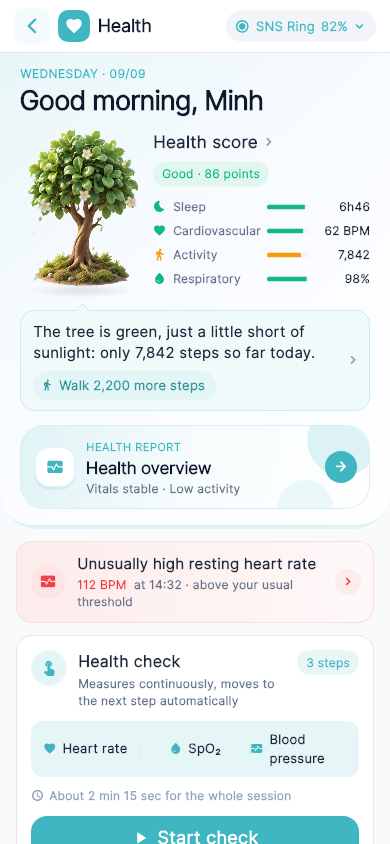
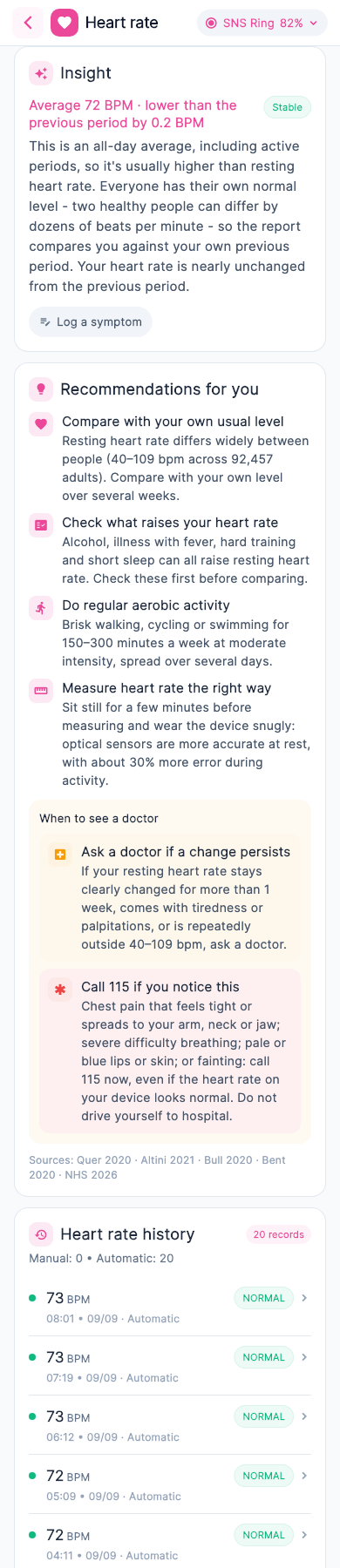
Hi, this is your tree
It doesn't need you to read a single number. Every day, the tree grows from what you actually lived: a good night's sleep, a calm heart rate, a few thousand steps. One glance is enough to know how you're doing today.
The five seasons of the tree
Three good days in a row, and the tree blooms. A few tired days, and its leaves fade and fall. But don't worry — rest enough, and it turns green again.

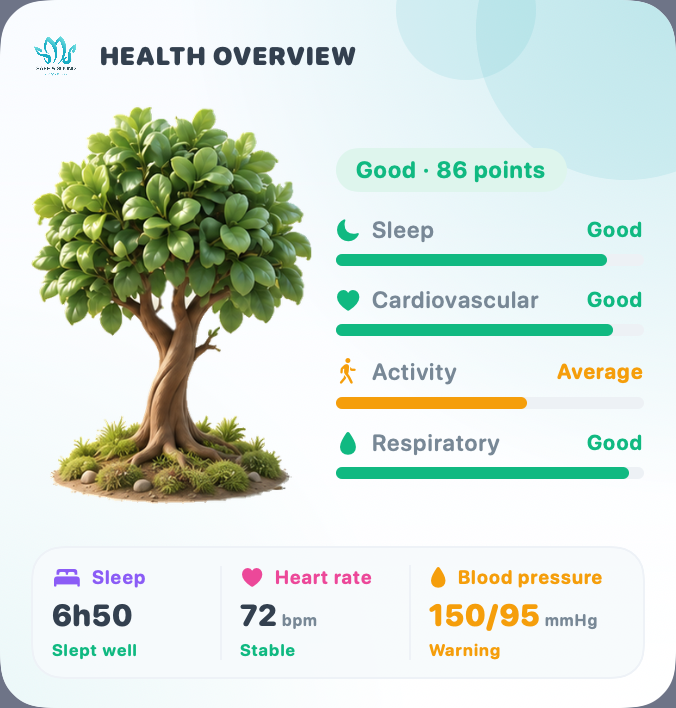
Blooming
A “Good” score three days in a row, today included.
“A great rhythm is blooming”

Healthy
Today's health score is “Good”.
“You're keeping a good rhythm today”

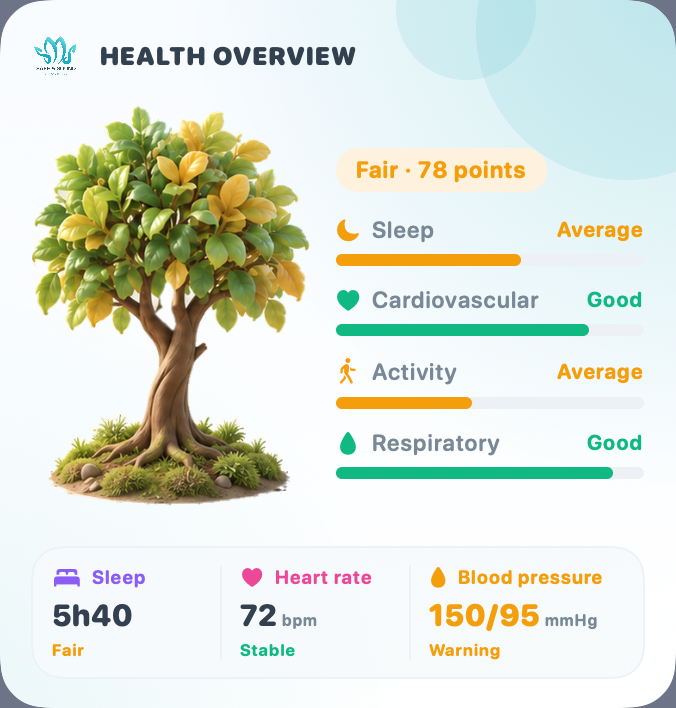
Recovering
A “Fair” score that is holding steady or improving on the last few days.
“Your body is finding its rhythm again”

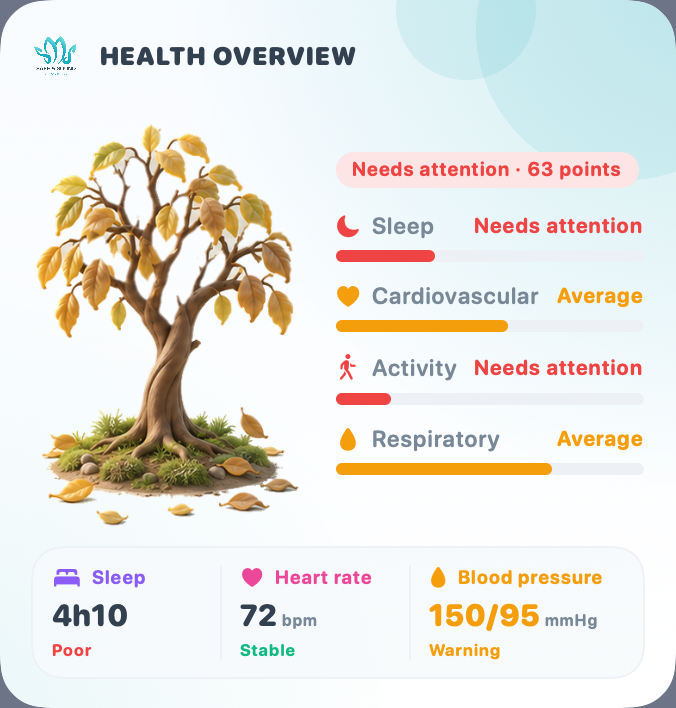
Starting to wilt
A “Fair” score that is slipping, or “Needs attention” with something still to hold on to.
“Today needs a little more care”

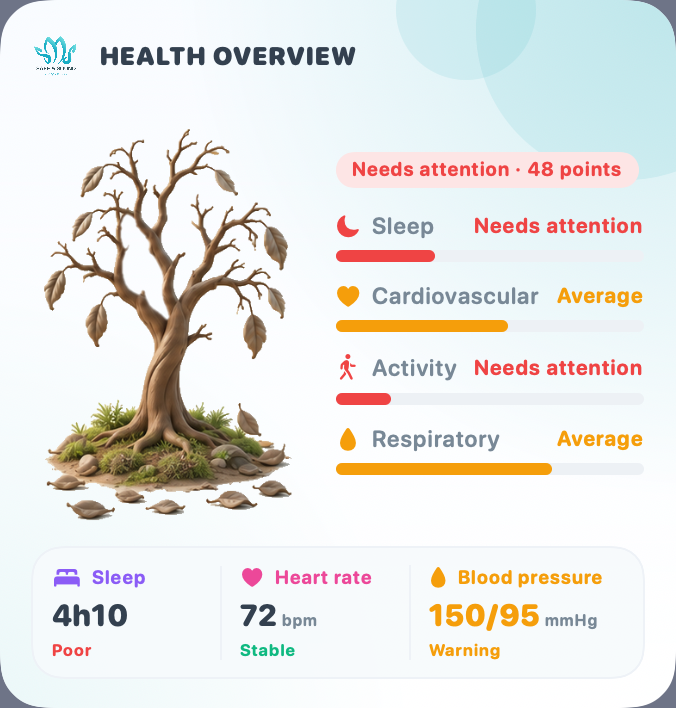
Dry
A low score with no sign of picking up yet. A full night's sleep is rain for it.
“Start again with the small things”
On a day with no data, the tree sleeps in gray, waiting for you to wear your device. The tree compares today with the average of the last 3 days to tell whether you are picking up or slipping.
Four roots hold the tree up
Sleep, Cardiovascular, Activity and Respiratory. Whichever root is short is where the tree is thirsty. You don't need to tend all four at once — care for just one root, and the tree will already change.
Sleep
How long you slept last night and how deep it was. 7–9 hours is best.
Cardiovascular
Your average heart rate through the day. Around 55–70 BPM is best.
Activity
The steps you took against a daily goal of 10,000 steps.
Respiratory
Blood oxygen level (SpO₂). 97% or higher is good.
If your device can't measure a metric, the tree scores you on what it does measure — you are never penalised for a missing sensor. Last night's sleep alone is enough for the tree to grow.
One short line for the whole day
Today is Good, Fair or Needs attention, with a score out of 100. Tap the tree anytime to see how the score is calculated and how it compares with previous days.
Good
The tree is green, and blooms after three good days running.
Fair
The tree is recovering, or starting to wilt if the score is falling.
Needs attention
A quiet reminder to slow down and rest more.
The tree's note
Every day, a small bubble under the tree tells you what is feeding it, what it is short of, and one thing to do today.
→ Walk 2,200 more steps
- Tap the note to open “What is feeding the tree?”: the four sources with today's readings
- The source that is short is tagged “The tree needs this”
- The first visit of the day shows the note in full; later visits fold it into a leaf on the crown, one tap from reading it again
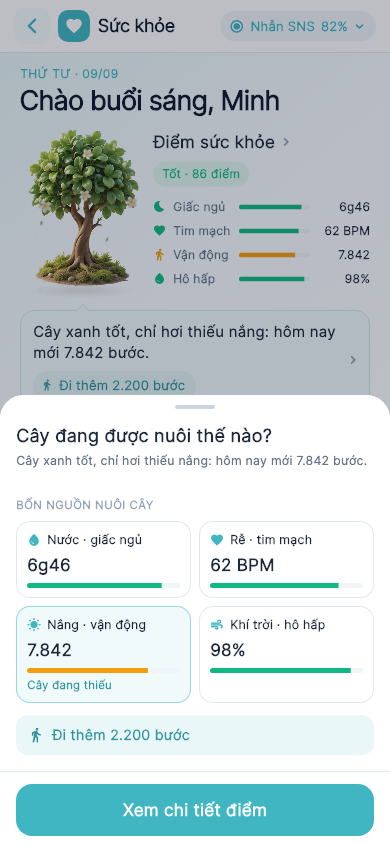
“Enough water, sunlight and fresh air — the tree is in bloom.”
Tip: Keep the rhythm of the past few days
“The leaves droop a little today. Slow down a bit and the tree will perk up.”
Tip: Rest and drink enough water · Breathe slowly for 5 minutes
“The tree's branches are dry. A full night's sleep is rain for it.”
Tip: Be in bed by 22:30 tonight
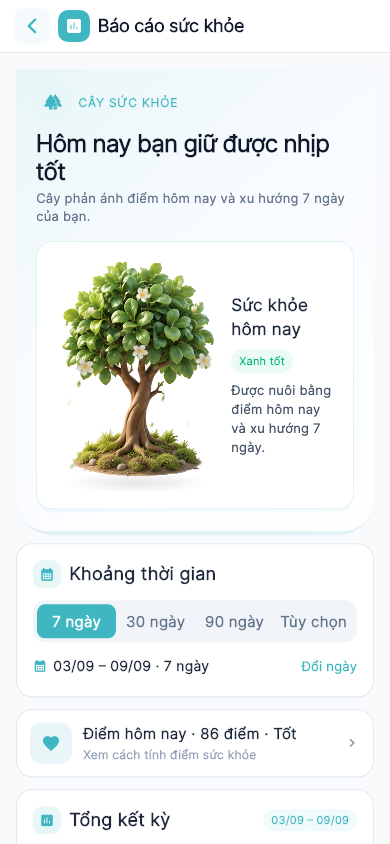
Health report
The report opens with your tree, reflecting today's score and the 7-day trend. Below it is a summary for the period (7, 30, 90 days or custom), with an insight and cited advice for every metric.
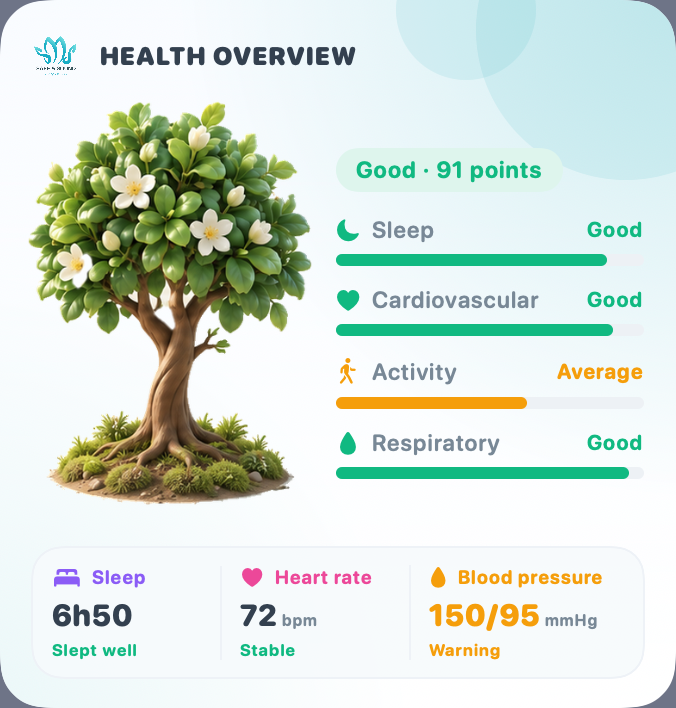
The tree on your home screen
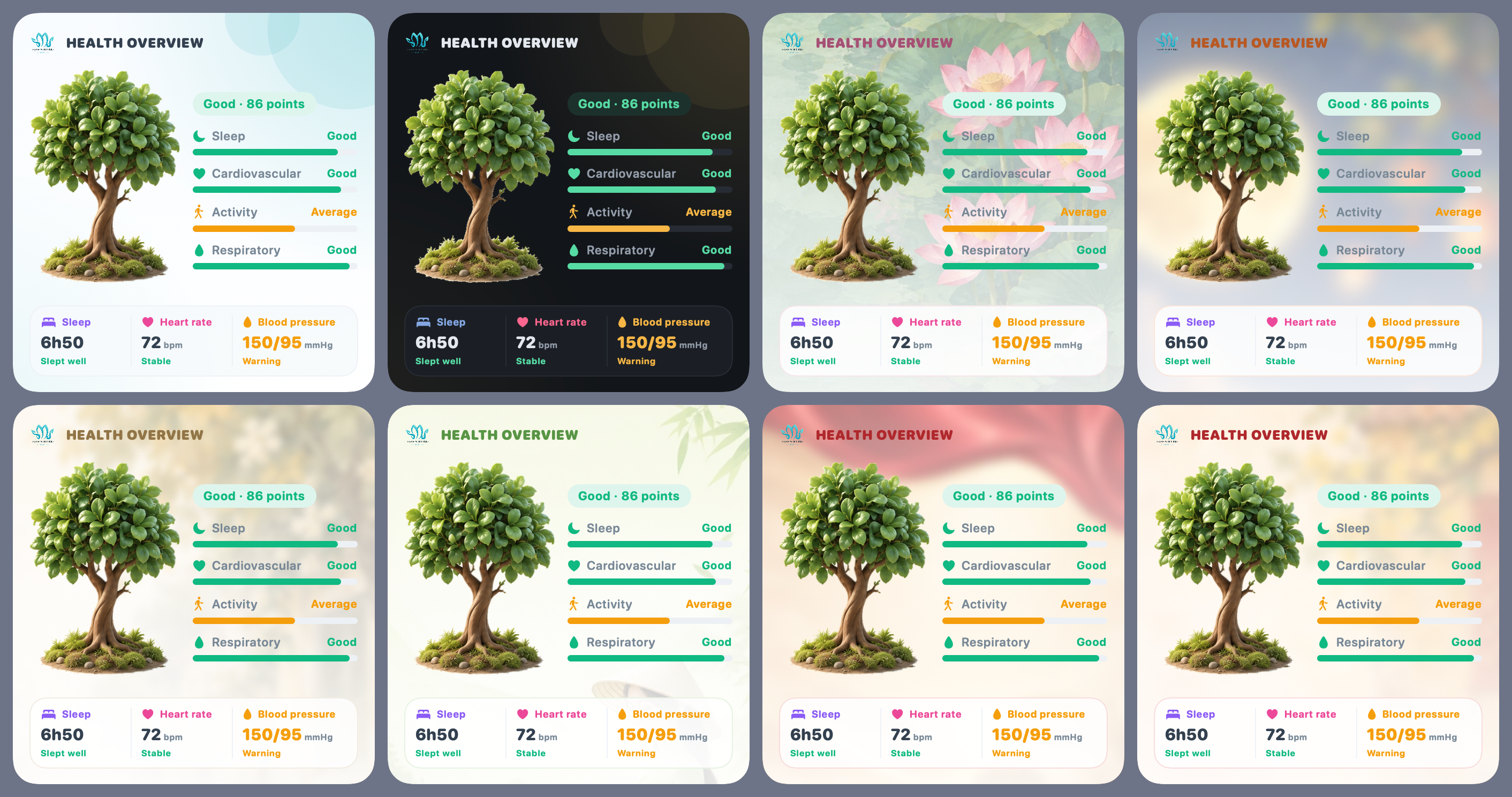
The iPhone widget shows your tree, health score, the four roots, last night's sleep, and today's heart rate and blood pressure. The tree on the widget follows your season.
Three IMT SmartBand devices
Safe & Sound now supports three new wristbands. Wear them day and night; your data syncs to the app automatically.
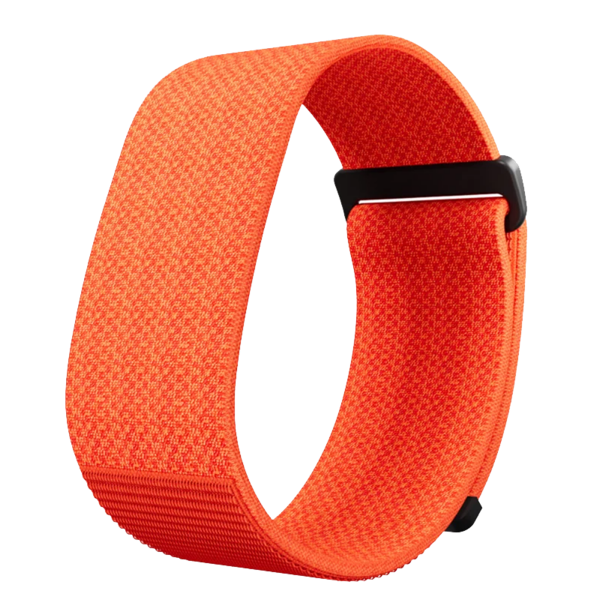
IMT SmartBand Gen 1
A light fabric band that tracks your health all day and through the night.
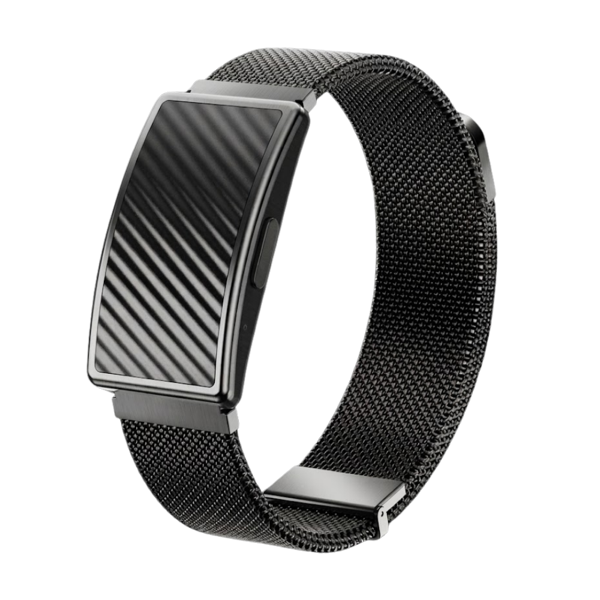
IMT SmartBand Gen 2
A metal body on a mesh strap, tracking your health all day and through the night.
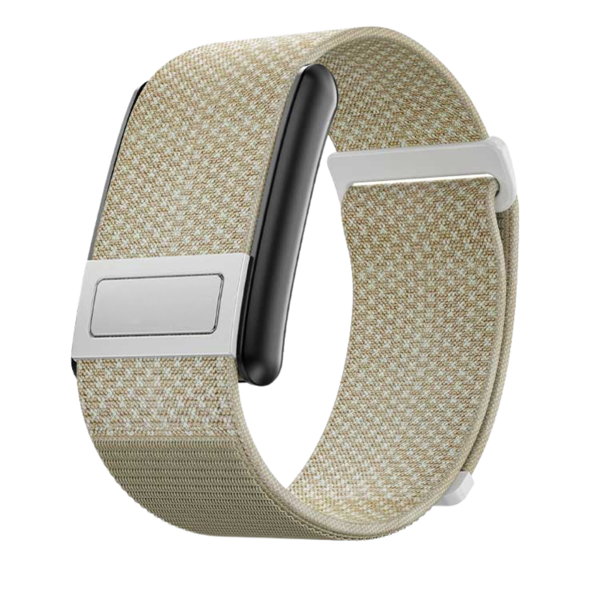
IMT SmartBand Gen 3
A metal contact for recording an ECG right on your wrist, plus everything Gen 1 and Gen 2 measure.
| Metric | Gen 1 V4 | Gen 2 V5 | Gen 3 V8 |
|---|---|---|---|
| Steps, distance, calories | |||
| Heart rate (automatic and on demand) | |||
| SpO₂ (blood oxygen) | |||
| HRV (heart rate variability) | |||
| Sleep stages | |||
| Blood pressure Estimated · Experimental | |||
| Wrist skin temperature | |||
| Electrocardiogram (ECG) |
In the app, the bands appear under their short names IMT SB Gen 1, Gen 2 and Gen 3.
More ways to understand your body
Track stress, your cycle and your activity, record an ECG, and see your health right on your home screen.
Stress & Recovery
ExperimentalShows how much load your body is carrying, based on HRV (heart rate variability) measured during sleep, compared with your own normal range.
- Your personal range: the app learns it over about 14 nights, then compares every night against it
- Companion signals: lowest sleeping heart rate and sleep regularity
- Daily stress check-in (1–5) with a note. After 14 days, the app shows how your ratings line up with your HRV
- Cited recommendations: keep a steady routine, stay active, breathe slowly


Menstrual cycle tracking
Female accountsLog and follow your cycle right inside Safe & Sound, combined with sleep and heart rate data from your device.
- Log your period, flow and symptoms every day
- Month calendar: periods, estimated fertile window and the predicted next period
- Cycle history with a note on how regular your cycles are
- Period reminders, with an optional discreet wording
- Your body through the cycle: sleeping heart rate, wrist temperature, HRV, sleep and SpO₂ in each phase
- Phase tips and short reads, all cited
Shown to female accounts only. Not for contraception.
Home screen widget
iPhoneSee your health at a glance, without opening the app.
- The Health tree and today's score
- The four roots: sleep, cardiovascular, activity, respiratory
- Last night's sleep, heart rate, blood pressure rated Stable / Warning / Danger
- Follows the theme you use in the app
Electrocardiogram (ECG)
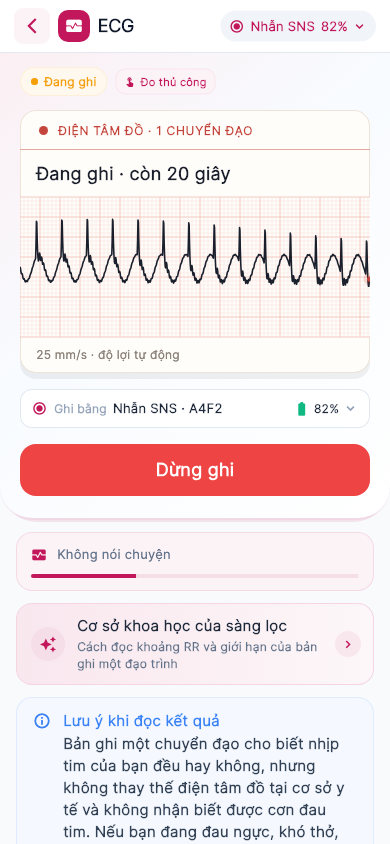
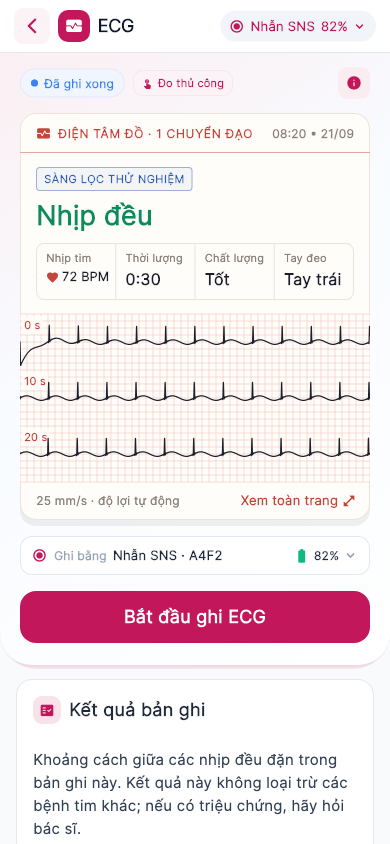
IMT SmartBand Gen 3 (V8) onlyRecord a single-lead ECG right on your wrist, with automatic rhythm screening.
- 30-second recording: wear the band on one wrist, rest the index finger of your other hand on the metal contact in the middle of the band, and sit still
- Live ECG strip on 25 mm/s grid paper while recording
- Automatic rhythm screening with three results: Regular rhythm · Irregular rhythm, check with a doctor · No conclusion, each with an explanation and what to do next
- A printed-style ECG report: verdict, average heart rate, duration, signal quality, wrist worn and the whole recording in 10-second rows
- Full-page view with pinch-to-zoom on every beat; a recording history you can take to your doctor
Apple Health
iPhoneSafe & Sound is now part of Apple's health ecosystem.
- Sends heart rate, SpO₂ and sleep to Apple Health
- Brings step counts from Apple Health into Safe & Sound, even without a band
- Connect once, right from the Health screen
Steps & Calories
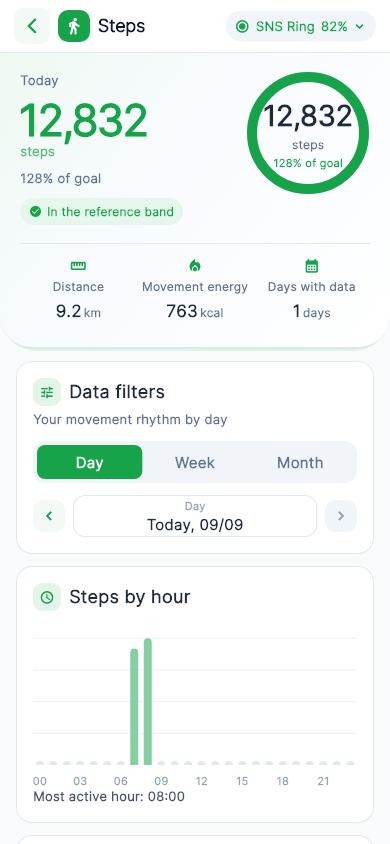
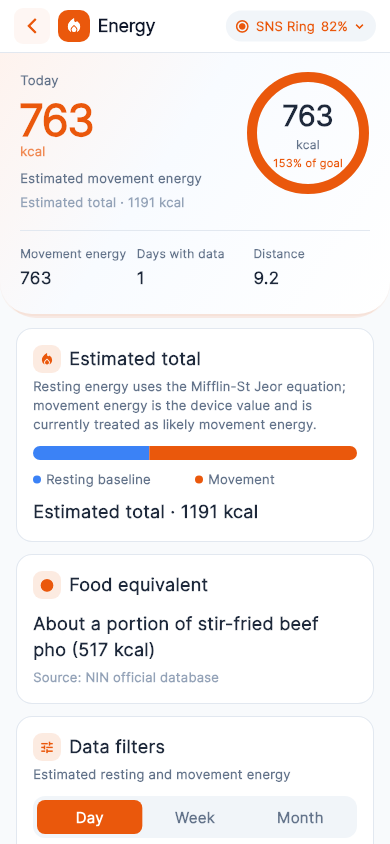
Two dedicated screens for your daily activity.
- Steps by hour, your most active hour and longest still stretch
- Energy burned: resting baseline and movement energy
- Shown as familiar food, e.g. “about a portion of stir-fried beef pho”
English & Vietnamese
The app now speaks two languages: English and Vietnamese. Switch any time under Language in the app; health screens, advice, reminders and the widget all follow your choice.
Deeper into every metric you track
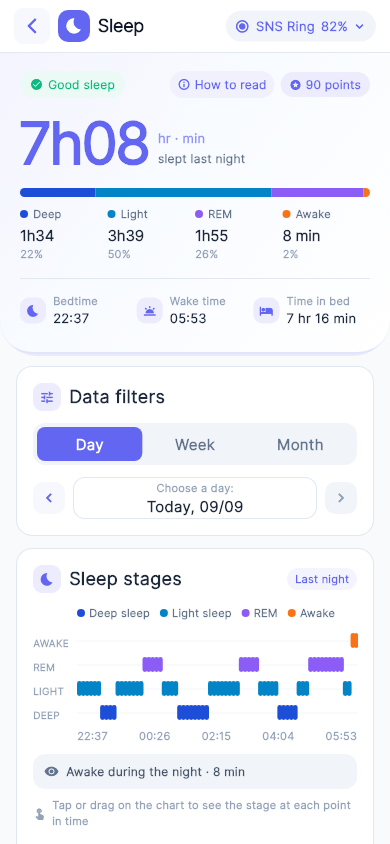
Sleep is analysed in depth, and every metric gets an insight from your own data plus advice backed by research.
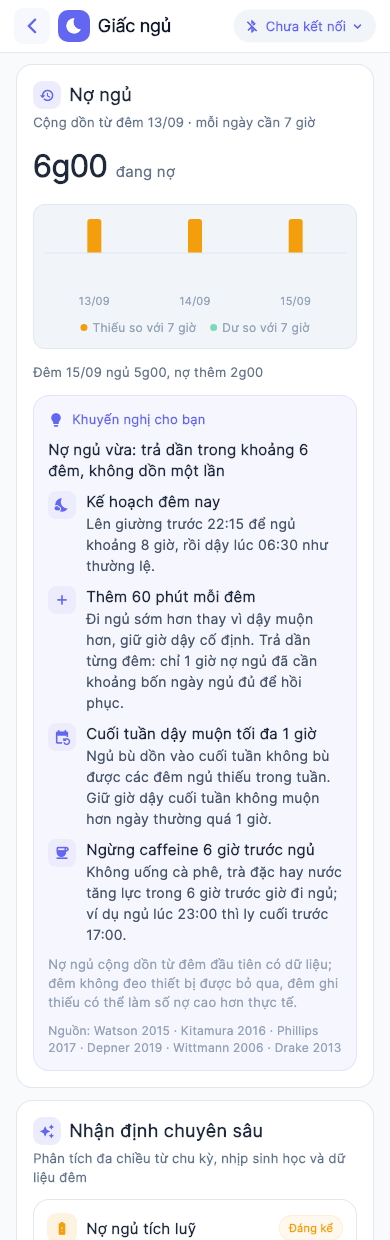
Sleep · Sleep debt
Adds up the sleep you are missing against 7 hours a night, and gives you a plan to pay it back gradually instead of all at once.
Tonight's plan: be in bed by 22:15 for about 8 hours, then get up at 06:30 as usual.
Sleep architecture
- Sleep efficiency and number of sleep cycles
- Deep and REM sleep compared with you
- Whether deep sleep comes early in the night; awakenings
Regularity
- Sleep regularity score out of 100
- Weekend jet lag
- Sleep debt over 7 nights
Night metrics
- Heart rate, SpO₂, blood pressure, HRV through the night
- Autonomic recovery: heart-rate dip, lowest rate, overnight HRV
- Sleeping SpO₂, with a warning when oxygen drops repeatedly
Activity & sleep
- How daytime steps relate to the following night
- In-depth insights grounded in research, with sources
Heart rate · SpO₂ · Blood pressure · HRV
The Insight is now worked out from your own readings over the period you pick — no more one-size-fits-all sentence.
- Compared with your usual level, not just a general threshold
- Three levels of advice: keep an eye on it · see a doctor · call emergency services
- Every piece of advice cites its research
- Dense heart-rate data is grouped into 5-minute buckets, keeping the lowest and highest values
Smoother and faster sync
- Faster start-up, no more stutter on the Overview screen
- Today's steps, calories and distance update live while your band is connected
- Signing in on a new phone brings back your last 90 days
- Data is stored on the phone and in the cloud, and nothing is lost when you sign out
Bug fixes
- The first heart rate / SpO₂ measurement after opening the app sometimes returned nothing
- Some nights were split in two, with the second part shown as awake
- Steps were counted twice when using more than one device
- Wrong temperature values; notifications stuck on screen
- Many English translation fixes
A full refresh, plus 7 new themes
The whole app has been redesigned with a clean medical-tech look. Seven new Vietnam-inspired themes recolour both the app and the widget.







Each theme on the Health screen
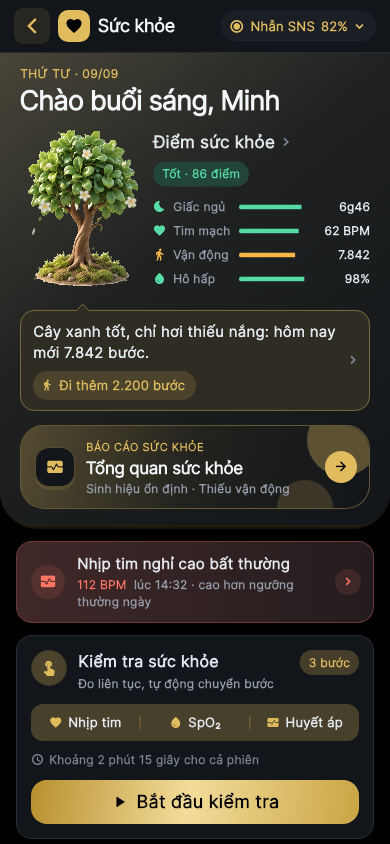
Priority
Priority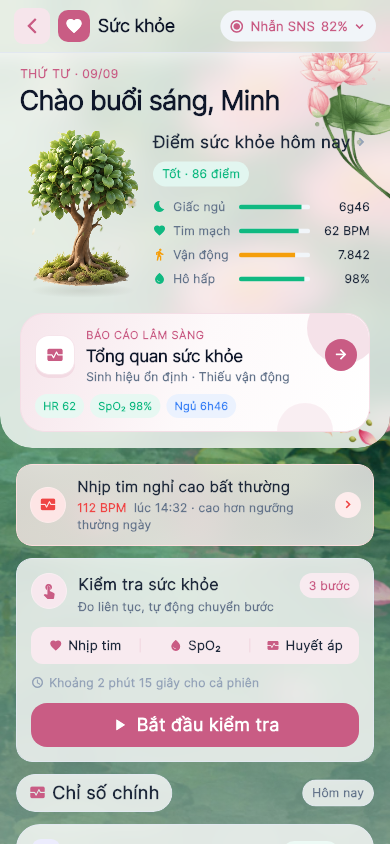
Vietnamese Lotus
Priority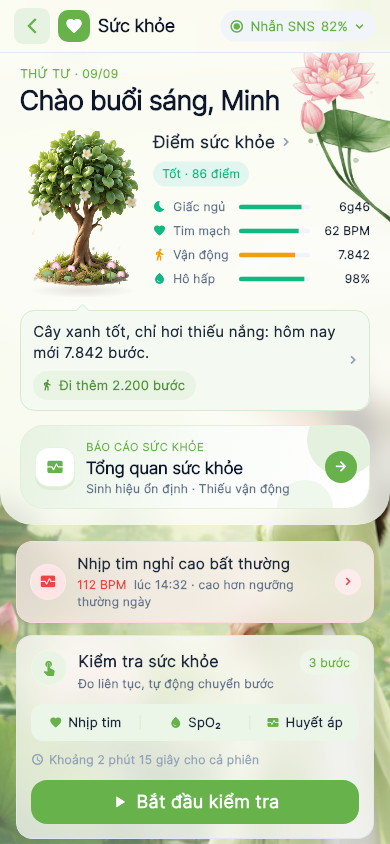
Vietnamese Áo Dài
Priority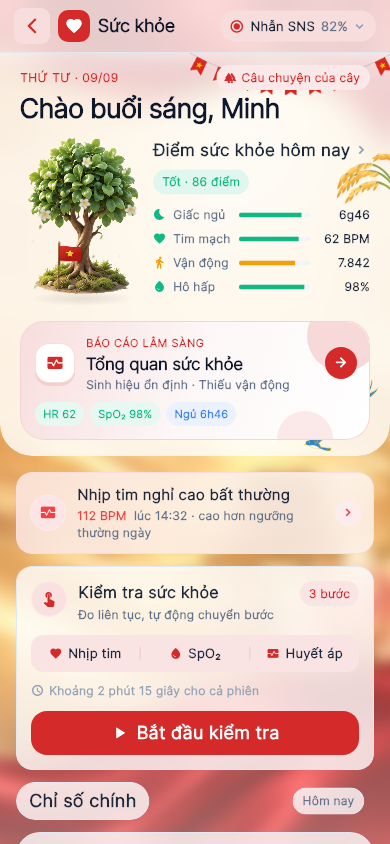
Vietnam Pride
Priority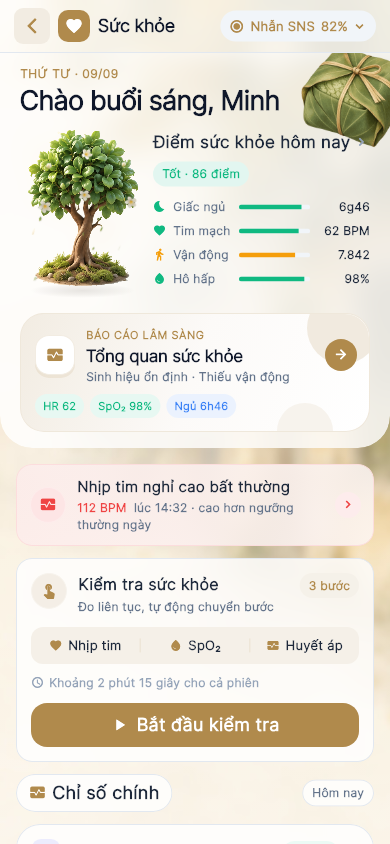
Hanoi Autumn
Priority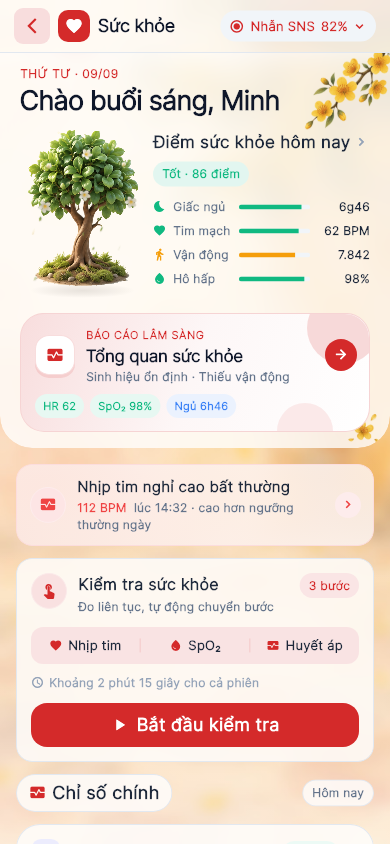
Lunar New Year (Tết)
Priority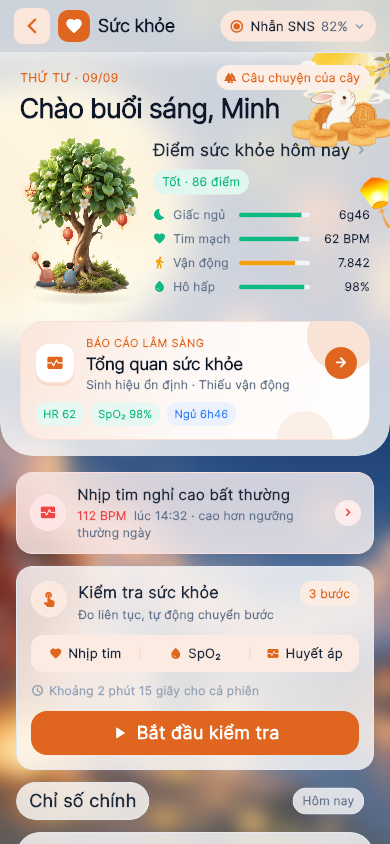
Mid-Autumn (Trung Thu)
All usersDefault
All usersTo unlock the Priority themes, please contact Safe & Sound.
The widget follows your theme
Update to version 2.0.1
It takes about 1–2 minutes. Updating keeps all your data and you don't need to uninstall anything. In the stores, the app is called SafeNSound.
Open the app's store page and tap “Update”
Tap a store button below (or scan the QR code at the top of this page with your camera). If the store button says “Open” instead of “Update”, you already have the latest version.

- 1
Open the App Store
Tap the blue App Store icon on your home screen.
- 2
Open your account
Tap your profile picture (or the person icon) in the top-right corner.
- 3
Refresh the update list
Pull the screen down and release to refresh, then scroll to the list of apps with updates.
- 4
Update SafeNSound
Find SafeNSound and tap “Update” (or “Update All”). You may need to confirm with your Apple ID password or Face ID.
- 5
Open the app and check
When the download circle finishes, open the app. Version 2.0.1 is shown at the bottom of the Profile page and at the bottom of the menu.
- 1
Open Google Play
Tap the Google Play icon on your home screen.
- 2
Open your account
Tap your profile picture in the top-right corner.
- 3
Manage apps
Choose “Manage apps & device”. On the Overview tab, under “Updates available”, tap “See details”.
- 4
Update SafeNSound
Find SafeNSound and tap “Update” (or “Update all”).
- 5
Open the app and check
When it has downloaded and installed, open the app. Version 2.0.1 is shown at the bottom of the Profile page and at the bottom of the menu.
Frequently asked questions
I don't see the update yet
Pull the update page down to refresh. New versions roll out to the stores gradually, so it can take a few hours to appear. Check your connection and try again later.
Will updating delete my data?
No. Updating keeps your account and data, and you don't need to uninstall the app. Your health data is synced to the cloud, even when you sign in on a new phone.
The app says “Update required”
Tap “Update now”. The app opens SafeNSound in the store; tap “Update” and you're done.
Can my phone run this version?
You need iOS 15.1 or later on iPhone and iPad, and Android 9 or later on Android phones.
The download stops or shows an error
Make sure there is enough free storage, switch to a stable Wi‑Fi network and try again. If it still fails, restart your phone and update again.
Need more help?
Call our hotline 0964 778 911 or 0965 240 911, or email safeandsound@imst.org.vn.